
Map Power, Interest and Pain Before You Pitch AI: The Stakeholder-Pain Map
PathPatron Use-Case Canvas series — 2 of 7
A practical stakeholder-mapping framework for AI use cases: turn a messy workflow problem into a conflict, a safe boundary and a named decision owner—before anyone chooses a tool.
An AI use case is never only a task design. It redistributes context, authority and consequence.
That is why a use case can look excellent in a workshop and still fail the moment it reaches the people who supply information, approve exceptions, carry the risk or quietly work around the new flow.
The Stakeholder-Pain Map is a short, evidence-led way to see that reality before you pitch a solution. It does not ask for a generic stakeholder list. It asks: whose work changes, what do they need to protect or achieve, what evidence supports that view, and who can settle the hard trade-off?
This is the practical second step in the PathPatron Use-Case Canvas. Start with People, Stakeholders and Targets: Whose Problem Are You Solving? to identify the case worth examining. Then use this map to turn that first story into a shared, evidence-led view of the people, tensions and decision rights around it—before you define the use case or choose a tool.
Start with a real collision
Take a new supplier onboarding case. Procurement wants the supplier ready quickly. Legal cannot approve the contract because a required clause is missing. Finance cannot activate bank details that fail a validation check. The business owner sees a delayed project start. The supplier has no clear next action.
None of those people is simply “resistant.” Each is responding to a different consequence. If a team frames the problem only as “supplier onboarding takes too long,” it may optimise speed while making control, data quality or accountability worse.
The map makes the collision visible before it becomes a bad workflow design.
Place the map in the Compass
This is a People practice first. The People Pillar asks who shapes adoption, value and trust. The Stakeholder-Pain Map makes that question operational for one real case.
It also connects three standing PathPatron lenses:
- Targets: Who Your Product Must Convince distinguishes the people whose acceptance a change needs.
- The Rise of the Influencer Stakeholder explains why formal reporting lines are not the whole story.
- The AI-Enabled Decider focuses on the people who can decide, fund, override or stop a change.
The map brings those concepts together around a single moment of work. It is not a separate workshop ritual; it is the repeatable bridge from the People lens to the Process lens.
What the map is for
A useful map moves through three layers:
- What happened? Capture observations, evidence and unknowns from one real case.
- What is at stake for each person? Translate those observations into a specific interest, pain, target or non-negotiable—not an assumed motivation.
- What must the design decide? Name the conflict, boundary and decision owner.
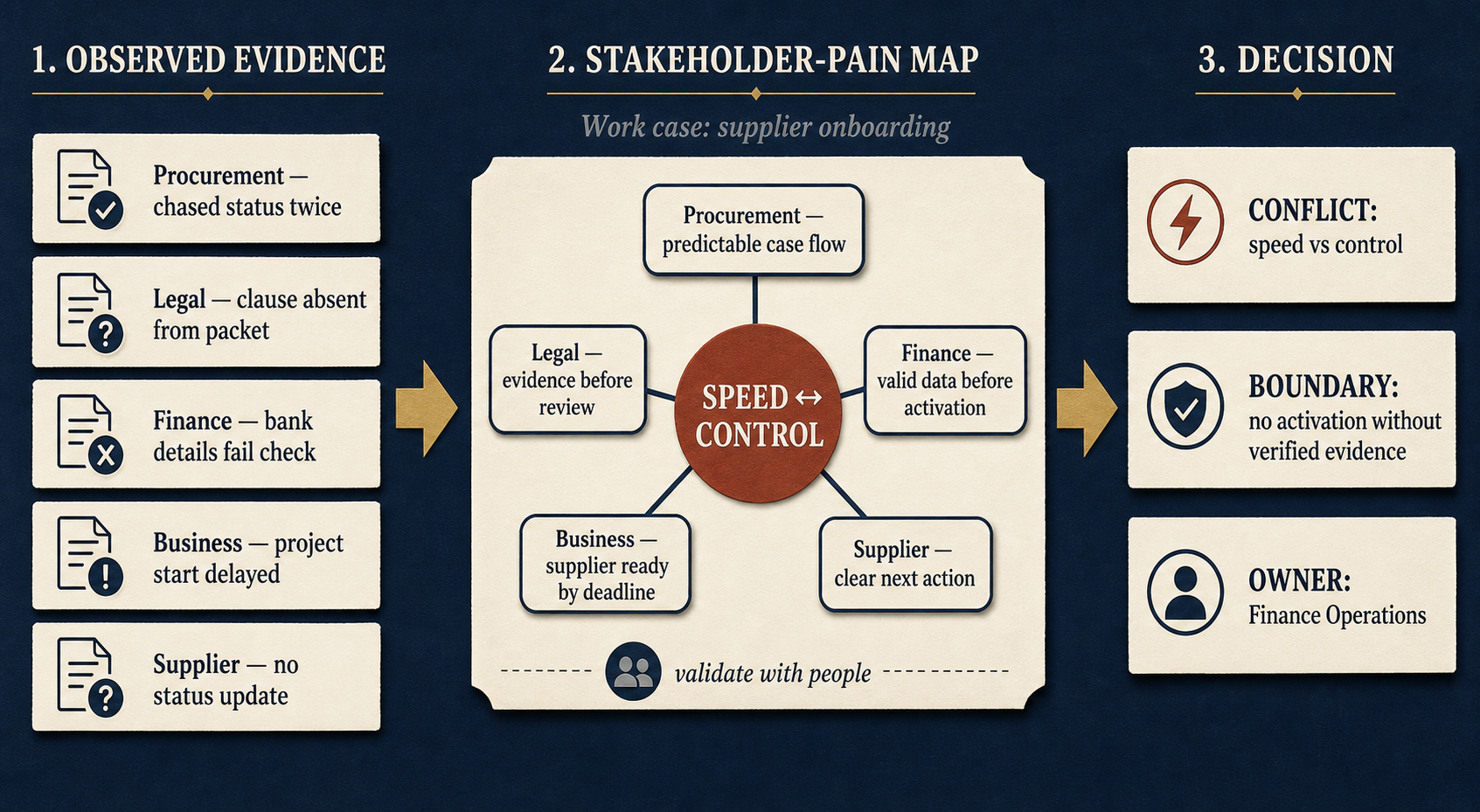
In the supplier case, “Procurement chased status twice” is an observation. “Procurement needs predictable case flow” is a target. They are not the same thing—and keeping them separate prevents the group from turning assumptions into facts.
The six fields
Create one line for every person who does one of the following: feels the impact, supplies critical information, approves an exception, owns a system or control, or could stop or work around the future workflow.
| Field | Capture | Supplier-onboarding example |
|---|---|---|
| Person | A real role, not a department | Procurement manager |
| Role in the case | What they do at the moment that matters | Chases missing documents and status |
| Interest, pain or target | What is at stake: one consequence they want to avoid or outcome they need | Predictable case flow |
| Evidence | What you saw, heard or can verify | Two status chases in one onboarding case |
| Authority | What they can approve, block, override or route around | Can escalate a stalled case, cannot waive legal review |
| Non-negotiable | The line the future workflow must not cross | No supplier is presented as “ready” without verified documents |
The last two fields are where ordinary stakeholder mapping becomes useful for AI-enabled work. Interest matters, but authority and non-negotiables determine what the workflow may safely do.
Run the supplier case through the map
Do not leave the case at a list of roles. Here is what the same supplier-onboarding case produces when the team records evidence, targets and authority together:
| Person | What happened / evidence | Interest, target or pain | Authority or influence | Non-negotiable |
|---|---|---|---|---|
| Procurement manager | Chased status twice; documents arrived in different places | Predictable case flow and fewer chaser emails | Can escalate a stalled case | The requester gets a clear next action and status |
| Legal reviewer | Required clause was absent from the packet | Evidence before review | Can block contract approval | No contractual risk is accepted on incomplete evidence |
| Finance analyst | Bank details failed validation | Valid data before activation | Can stop vendor creation | No vendor record is activated with unchecked bank data |
| Business owner | Project start moved because the supplier was not ready | Supplier ready by the needed date | Can prioritise the business need, not waive controls | The critical delivery date and impact are visible |
| Supplier contact | Received a vague request and no status update | One clear request and route to resolution | Can delay the case by withholding clarification | No repeated, contradictory requests from different teams |
The map exposes the real design task: make the case move predictably without treating control checks as optional. It also tells the next Process article exactly what to trace: the hand-offs, systems, waits and exception route between these people.
Map formal power and informal influence
Do not stop at the org chart.
Formal power is visible: who signs off, grants access, owns a budget, approves an exception or can stop a system action.
Informal influence is often where designs fail: the experienced coordinator everyone asks when the record is unclear; the frontline user who has a reliable workaround; the supplier contact who decides whether to send the information in the first place.
Ask two separate questions for each person:
- What can they formally decide, approve or block?
- How could they influence the outcome even without that formal right?
An informal workaround is not automatically resistance. It can be evidence that the official flow lacks context, creates unsafe delays or has no usable exception route.
Make the first map in 30 minutes
Use one recent, real case. Do not begin with an ideal future process.
- Write down the person with the clearest pain: what were they trying to get done, and what happened instead?
- Add every person who supplied information, received the impact, approved an exception, owned a control or could have stopped the case.
- For each person, record one observation and one target. Mark every point as Evidence, Hypothesis or Information gap.
- Add their decision right and their non-negotiable. If neither is known, leave it as an information gap.
- Ask: If this person could stop, override or quietly work around the new workflow tomorrow, have we included them?
- Finish with three shared statements: the conflict the change must resolve, the boundary it must not cross and the person who owns an exception decision.
The output is not a solution. It is a better starting position for the current-state process map and, later, for comparing future-state options. Use Map the Work Before You Automate It to trace the operational reality once this People map has surfaced the stakes.
Use AI for a first pass—not for the answer
An LLM can help structure a first pass when a team has messy notes, a call summary or a real case description. It cannot tell you what people truly need, what authority they hold or what they will accept. Treat its output as hypotheses to test.
Copy and adapt this prompt, using anonymised and non-sensitive case details only:
I am mapping a real workflow case. Help me create a first Stakeholder-Pain Map.
Do not invent facts or motivations. Label every point Evidence, Hypothesis, or Information gap.
First, ask me up to five clarifying questions. Then present a table with: Person; role in the case; observation/evidence; pain or target; formal authority; informal influence or likely workaround; non-negotiable; and evidence still needed.
Then identify: (1) the central conflict the proposed change must resolve; (2) a boundary it must not cross; and (3) the likely decision owner for exceptions.
Do not recommend an AI tool, vendor or solution yet.
Validate the resulting map with the people involved. A model is a hypothesis generator, not stakeholder evidence.
Make it an organisational practice, not a one-off workshop
Leaders should not have to remember this method at the exact moment a new AI idea arrives. Set a light operating rule: every proposed AI or automation use case gets a Stakeholder-Pain Map before it receives budget, tool selection or pilot approval.
Give teams several workable modes. The standard should be consistent; the format can stay proportionate to the work.
| Mode | When it works | What the leader puts in place |
|---|---|---|
| Running list or spreadsheet | Small teams, early discovery, recurring operational issues | A shared template with the six fields, one named case owner and a monthly review. It is boring—and therefore easy to maintain. |
| Facilitated working session | Cross-functional or contested cases | A 30-minute session with the people who carry the work, followed by one owner who records evidence gaps and decisions. |
| AI-assisted first pass | Notes are messy or the team needs help structuring a first view | An approved enterprise AI workspace, the prompt above, anonymised inputs and a human validation step. |
| Reusable AI skill or project | The organisation has repeated use-case discovery work | A shared instruction pack in the approved AI tool that asks the same questions, produces the same table and never recommends a solution before evidence is checked. |
For the final mode, do not build a grand “stakeholder-mapping agent.” Build a small, governed practice: a template prompt; the six-field output; approved data boundaries; named human validation; and a place where the final map lives. In ChatGPT, Claude, Copilot or an internal assistant, this can be a shared project or custom instruction. Its job is consistency and preparation—not deciding what people need.
The leader’s enablement checklist is simple:
- Make the map a gate in the use-case intake or investment process.
- Give teams one maintained template and one approved AI-assisted prompt.
- Define which case details may enter an AI tool and which must stay in the internal record.
- Assign an owner for keeping the evidence, decision owner and non-negotiables current.
- Review the map when a pilot changes scope, data access or authority.
That is how a useful technique becomes organisational muscle rather than a document someone remembers once.
Turn the map into three design choices
The map earns its place only when it changes a decision. End with these three outputs:
1. The named conflict
State the trade-off plainly. In our supplier case: speed of onboarding versus verified evidence before approval.
This gives the future-state discussion a real problem to solve. It avoids vague claims such as “make the process more efficient.”
2. The non-negotiable boundary
State what the new workflow must never do. For example: No supplier may be marked ready, activated or paid until the required documents and bank-detail checks have been verified.
This boundary can inform process rules, system controls, human review and any later AI authority. It is much safer than deciding first that “the agent should handle onboarding.”
3. The decision owner
Name the role that can settle an exception where speed and control genuinely collide. This is not necessarily the senior person in the room. It must be the person with the mandate, context and accountability to decide.
If nobody can be named, that is not a formatting issue. It is an operating-model gap the use case has surfaced.
From map to process—not from map to tool
The next step is to map the work: hand-offs, systems, waiting time, missing context, approvals and exception loops. Only then can a team judge whether the right response is to standardise work, improve a system, change a policy, automate a stable rule, add AI assistance or leave a human decision intact.
The Stakeholder-Pain Map protects that sequence. It makes the people, authority and consequences visible before technical possibility takes over the conversation.
A final test before you pitch the use case
Before presenting a use case, ask:
- Whose pain has evidence behind it—and whose is still an assumption?
- Which target conflicts with another person’s non-negotiable?
- Who supplies the evidence the workflow depends on?
- Who can formally approve, override or stop an action?
- Who will own the outcome when the workflow is live?
If the answers are unclear, the use case is not ready to pitch. It needs a better map, not a shinier tool.
The Canvas is iterative. Validate the map as you learn from the work, testing and people who carry the outcome.
Continue the PathPatron Use-Case Canvas
- 1/7: People, Stakeholders and Targets: Whose Problem Are You Solving?
- 2/7: Map Power, Interest and Pain Before You Pitch AI: The Stakeholder-Pain Map — you are here.
- 3/7: From Pain Point to a Real Use Case
- 4/7: Map the Work Before You Automate It
- 5/7: The Cost of Not Solving: Making Process Pain Visible
- 6/7: From Current State to a Credible Future State: Cost, Control & Change
- 7/7: Requirements Engineering for AI-Enabled Work