Toolkit

Print it. Fill it in. Decide with it.

The frameworks behind the Briefings, as working sheets you can put on a table. Free, no sign-up, made to be written on.

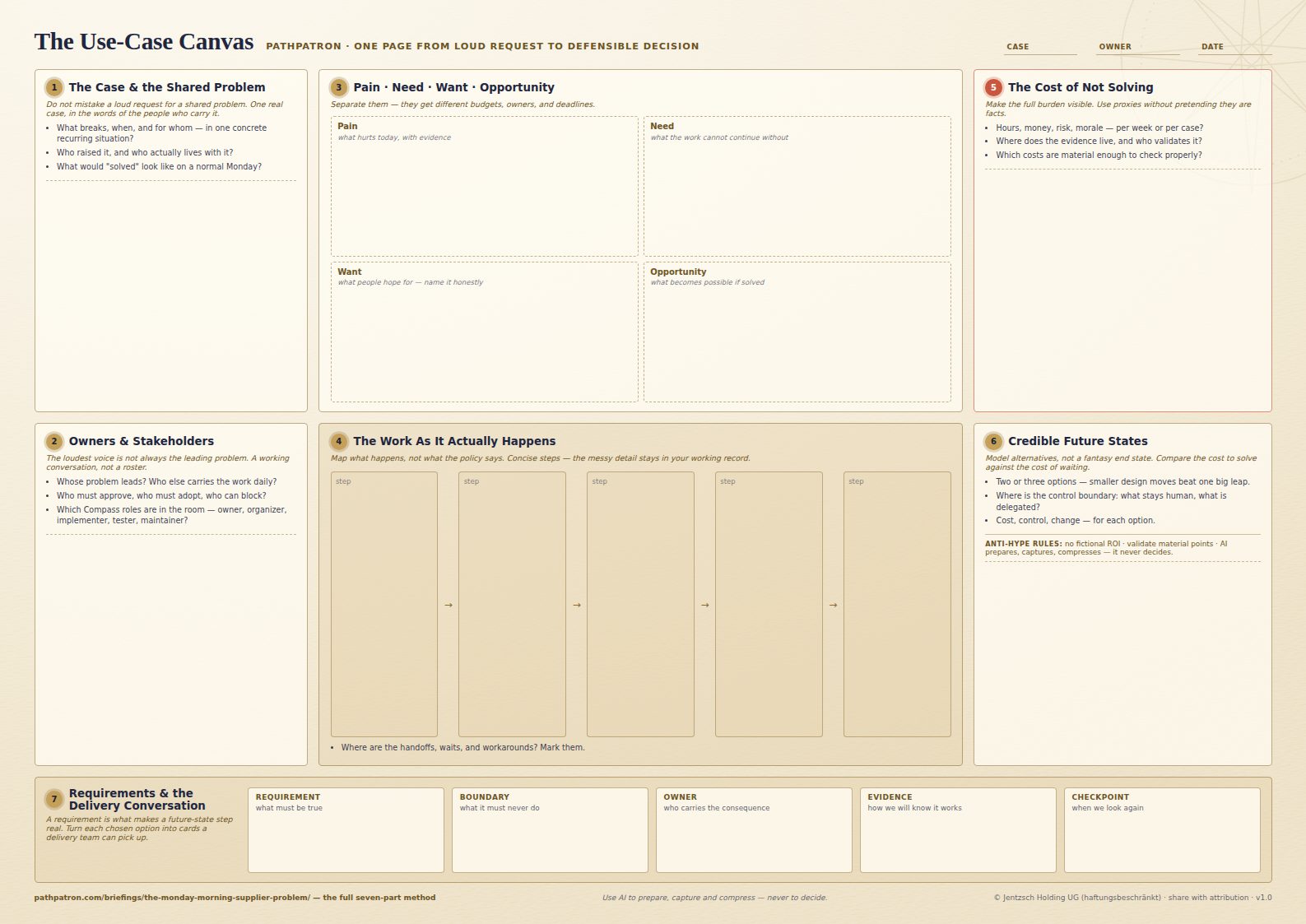
The Use-Case Canvas: an A3 landscape working sheet with seven numbered areas, from the shared problem through owners, pain and need, the work as it happens, the cost of not solving, future states, and requirements.

Working tool 01

The Use-Case Canvas

Most AI projects start with a request that is loud, vague, and already solution-shaped. The Canvas slows that down for one page: it takes a single real case and walks it through seven areas — problem, people, evidence, the work as it happens, cost, options, requirements — until what comes out the other side is a decision you can put in front of anyone.

Format
PDF · A3 landscape · 1 page
Price
Free — no sign-up, no email wall
Use
Share and print freely, with attribution
Version
v1.0

What is on the sheet

Seven areas, in the order you fill them in.

Each one is worked through on a single real supplier-onboarding case in the seven-part series behind the Canvas — follow any area into its part.

  1. The Case & the Shared Problem

    One real, recurring situation — in the words of the people who carry it. A loud request is not yet a shared problem.

    Part 1The Monday-Morning Supplier Problem 
  2. Owners & Stakeholders

    Whose problem leads, who lives with it daily, who must approve, adopt, or can block. A working conversation, not a roster.

    Part 2The Supplier Case Has More Than One Owner 
  3. Pain · Need · Want · Opportunity

    Four things people routinely collapse into one. Separated, they get different budgets, owners, and deadlines.

    Part 3From Pain Point to a Real Use Case: Needs, Wants and Opportunities 
  4. The Work As It Actually Happens

    The real path of the work — handoffs, waits, and workarounds marked — not the version in the process document.

    Part 4Map the Work Before You Automate It 
  5. The Cost of Not Solving

    Hours, money, risk, and morale made visible, with proxies named as proxies and material claims sent for validation.

    Part 5The Cost of Not Solving: Making Process Pain Visible 
  6. Credible Future States

    Two or three honest options compared on cost, control, and change — including where the human control boundary sits.

    Part 6From Current State to a Credible Future State: Cost, Control & Change 
  7. Requirements & the Delivery Conversation

    Each chosen move turned into cards a delivery team can pick up: requirement, boundary, owner, evidence, checkpoint.

    Part 7Requirements Engineering for AI-Enabled Work 
Read the series in order, from part 1

How to run it

A working session, not a template to fill out alone.

The Canvas earns its keep in a room with the people who live with the problem. Everything it asks for is something one of them already knows and nobody has written down in the same place.

Print it big.

A3 landscape is the intended size — one sheet a group can lean over. A4 or US Letter works for solo prep; "fit to page" keeps every area readable.

Fill it in with the people who carry the work.

Ninety minutes, one real case, the practitioners in the room. The Canvas is a conversation structure, not a form to submit.

Keep the detail elsewhere.

The sheet holds the decisions; your working record holds the interview notes, the numbers, and who validated them.

Let AI prepare, capture, and compress — never decide.

Use it to summarise interviews, draft the process map, tighten the wording. The judgment on the sheet stays yours, and stays attributable.

More tools

The Toolkit is being built in public.

The Use-Case Canvas is the first working sheet. Others follow the same rule: a tool ships only once a series has worked it through on a real case. New ones go out with the Briefings — free, and in the same format.

GoBeyond Briefings

Double opt-in via Brevo. Unsubscribe anytime.