
PathPatron Use-Case Canvas — 3 of 7
“We should use AI for supplier onboarding” is not a use case. It is a direction of travel.
By Monday morning, Maya has more than a familiar request for speed. She has one recent supplier case, the people around it, the evidence each can bring and the first tension the team must resolve: make the case move predictably without making incomplete evidence look complete.
That is enough to begin the next decision. It is not enough to choose a tool.
A use case becomes worth pursuing only when a team can explain whose problem is recurring, what proof exists, what outcome matters, and what must not be weakened to achieve it. That is the bridge between the first People map and the Stakeholder-Pain Map: first see who carries the work; then turn what you learn into a decision that can be tested.
This is not bureaucracy before innovation. It is how leaders stop a loud complaint, a senior request or a shiny tool from becoming the organisation’s default problem statement.
The first 20–30 minute map is a People practice: start with the people who carry the work, their evidence and their decision rights. This article turns that map into a candidate use case. The next stage is a Process practice: map the work before you automate it and test where an intervention could genuinely help. These are not separate frameworks; they are connected decisions in the People Pillar and Process Pillar.
Continue Maya’s supplier-onboarding case
The opening two articles established the same case: a supplier cannot be activated because documents, contract evidence and bank data move unevenly across Procurement, Legal, Finance, the business owner and the supplier. Everyone experiences a genuine problem. They are not all asking for the same thing.
Maya does not let the loudest request name the problem. A team that frames the case only as “Procurement needs AI to speed onboarding” can easily build a faster chase mechanism while leaving the actual controls, gaps and ownership confusion untouched.
Before the activity: bring the map, not a blank ambition
Maya and the team have already done the preparation. They have chosen one consequential supplier-onboarding moment, identified who carries the work, gathered evidence and named the tension between speed and control. Article 3 does not restart that work on a blank Canvas. It continues the same journey by opening the Pain Point / Opportunity area and turning what the team already knows into one bounded candidate use case.
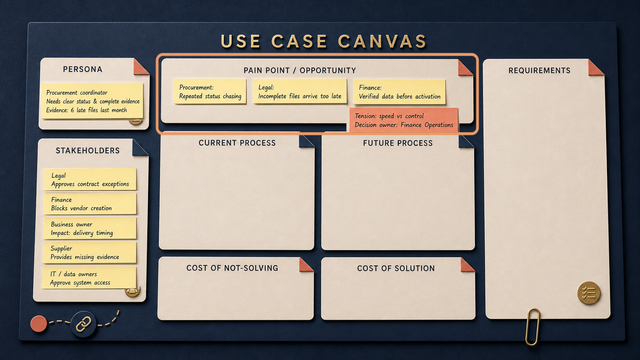
Maya now runs a short activity, not another discovery project. She starts with the record from Articles 1 and 2, makes space for the team to sort it, then uses the result to create a concise Canvas summary. The detailed working notes stay in the activity record; the Canvas holds the decision-ready version.
This works in either setting. Online, Maya creates the board in Mural, Miro or the organisation’s approved whiteboard, then gives each participant a small, named area to add evidence before discussion starts. In a meeting room, she prints the same four headings as cards, puts them on a wall beside the Canvas and hands out sticky notes. The medium changes; the discipline does not: one note should make one claim that someone can point back to in the case.
Use the dedicated activity board with four large notes—Pain, Need, Want and Opportunity—and one blank Use-Case Statements working area. Start in silence for five minutes. Each person adds the evidence they know to the appropriate column. This short pause prevents the first confident voice in the room from naming the problem for everyone else.
Once the evidence is visible, Maya asks the team to discuss, group and validate it. The four columns are deliberately kept separate: a pain is not automatically a need, a want is not automatically a requirement, and an opportunity is not a tool choice. The blank working area is where the team can write, compare and refine possible use-case statements in its own words. It is working space, not another part of the Canvas.
Maya’s 45-minute activity
| Time | What Maya does | What the team has at the end |
|---|---|---|
| 0–5 min | Reconnects the group to the Article 2 map: the people, evidence and speed-versus-control boundary already identified. | One shared starting point, not a blank Canvas. |
| 5–12 min | Gives everyone silent time to add source-backed observations to Pain, Need, Want or Opportunity. | Initial evidence, plus visible unknowns. |
| 12–25 min | Groups duplicates, tests the wording with the people closest to the work and separates evidence from assumptions. | Four clearer evidence clusters. |
| 25–35 min | Uses the blank working area to write and compare possible use-case statements. | Draft statements that can be traced back to the activity. |
| 35–45 min | Agrees the four concise Canvas notes, names what still needs validation and assigns the next owner. | A summary, open questions and a route into Article 4. |
How Maya uses AI without handing it the decision
AI makes the activity easier to work with; it does not decide what the case is.
- Before the session, Maya may use an approved tool on approved, anonymised Article 2 material to create a board skeleton and sort notes into Evidence, Hypothesis and Information gap. It must not infer a stakeholder’s authority, motivation, control boundary or the right intervention.
- During the session, approved transcription, whiteboard or note tools can capture contributions, group duplicate observations and flag notes without a source. Online, this happens in the board; in a room, Maya can photograph agreed checkpoints and transcribe the cards afterwards. The group supplies the meaning and makes the judgement.
- After the session, AI may propose concise wording for the four Canvas summaries and list unresolved questions. Maya and the relevant stakeholders check every line against the activity record before it is shared or placed on the Canvas.
Do not put personal, confidential or supplier-sensitive material into a tool that is not approved for it. AI is a preparation, capture and compression aid—not an unreviewed author of the use case.
Separate pain, need, want and opportunity
Use these four labels before discussing a solution:
| Label | What it means | Supplier-onboarding example |
|---|---|---|
| Pain | A negative experience happening now. | Procurement chases status in email and a spreadsheet. |
| Need | A condition that must be true for the work to succeed safely. | Legal needs the required clause and Finance needs validated bank data. |
| Want | A preferred improvement; valuable, but not automatically essential. | A business requester wants a live progress view; a supplier wants fewer follow-ups. |
| Opportunity | A credible chance to create value, capacity or better service. | A complete request reaches the correct reviewer once, with a visible next owner. |
The labels stop one familiar failure mode: treating a want (“automate the whole thing”) as if it were the need (“complete, validated evidence reaches the accountable reviewer”).
When interviewing each stakeholder, do not ask only “what do you want?” Ask: What is the most costly frustration today? What is tolerable for the moment but must be fixed in the next 6–12 months? What would a genuinely better day look like? Those questions reveal the difference between a pain, a structural need and a preferred future state.
Every note needs one of three labels: Evidence when the group can point to a source, Hypothesis when it is a plausible but untested reading, or Information gap when the team does not yet know. The person closest to the claim validates its wording. This keeps a polished sentence from silently becoming a fact.
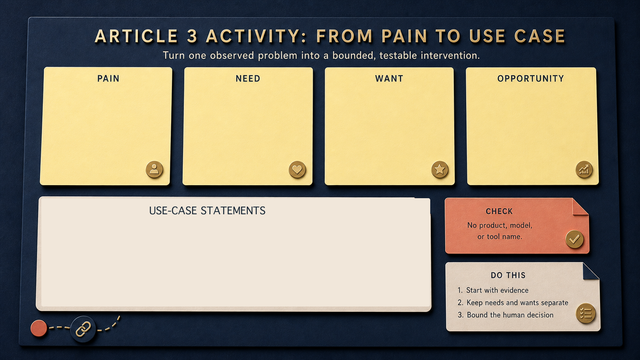
The evidence and stakeholder context from Articles 1–2 are not repeated. They are sorted into what hurts now, what must be true, what would be useful and where a credible opportunity may exist. The use-case statements are developed in the working area, not squeezed onto the Canvas.
Use the blank space for use-case statements
The Canvas is not the place for five long problem statements. Nor is the bottom of the activity board a pre-filled formula that tells the team what to conclude. Maya uses the blank Use-Case Statements space to capture the fuller working version once the group has sorted the evidence. The Canvas remains the concise summary.
There is no prescribed sentence to fit on the Canvas. In the working area, the team may use a fuller structure such as:
For [person / role], when [specific moment], [current condition] causes [consequence]. We need [observable outcome] without violating [non-negotiable].
For the supplier-onboarding case, Maya’s working area could hold several draft statements such as:
| Stakeholder | Testable problem statement | What to validate |
|---|---|---|
| Procurement | For the procurement manager, when a supplier is needed for a project, incomplete inputs and unclear hand-offs create repeated status chasing and delayed activation. We need a visible, predictable route to the next owner without asking Procurement to approve controls it does not own. | How many chaser emails occur per case? Where does a case wait? |
| Legal | For Legal, when a contract packet reaches review without the required clause or evidence, the reviewer must stop the case or accept unbounded risk. We need complete evidence before review without turning Legal into the data-collection team. | Which items are most often missing? What is the rework loop? |
| Finance | For Finance, when bank or tax data fails validation after the business expects activation, the team must reopen the case and explain a late control failure. We need valid data before activation without creating a second, hidden intake process. | What fails most often and how late is it discovered? |
| Business owner | For the business requester, when no one can explain the supplier’s status or expected timing, project planning becomes unreliable and work starts late. We need a trustworthy status and escalation route without promising a date the controls cannot support. | How often is delivery delayed? Which status information is actually useful? |
| Supplier | For the supplier, when requests arrive piecemeal with no named owner or next step, documents are resubmitted and activation stalls. We need one clear request and a predictable route to resolution without exposing internal approval details. | Which requests are duplicated? How long do suppliers wait for an answer? |
The group compares these statements, removes unsupported assumptions and keeps only the wording it can point back to in the evidence. This is a far better starting point than “automate supplier onboarding.” It describes the work that needs attention while leaving the solution open: clearer standards, shared case management, rules-based routing, document extraction, AI drafting assistance—or a combination.
Summarise the decision on the Canvas
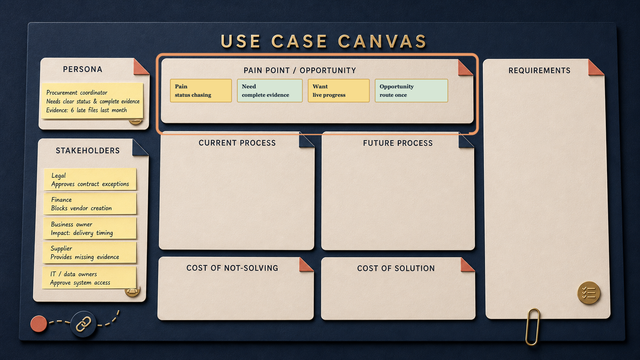
Now Maya completes the Pain Point / Opportunity area rather than starting another framework. She uses the activity record to distil four concise notes:
- Pain: what is breaking, delayed, repeated or risky today;
- Need: what must become reliably true for the person and workflow to work safely;
- Want: the preferred improvement that is useful but not yet non-negotiable;
- Opportunity: the credible improvement worth exploring.
For the supplier case, the Canvas might show: Pain: repeated chasing after late files. Need: complete evidence reaches the right reviewer. Want: a live, trustworthy progress view. Opportunity: route one complete request to the next accountable owner.
Maya can use an approved AI tool to turn the validated working notes into these short, plain-language summaries. The team checks every line against its evidence before it reaches the Canvas. AI helps compress the record; people remain responsible for its meaning, boundaries and decision.
The fuller use-case statements stay in the activity record. This is the bridge from people-side evidence to operational inspection: the Canvas makes the evidence legible at a glance; the working record preserves what the team meant by it. Article 4 follows the case through the work that really happens.
What leaves the session
Maya does not leave with a tool decision or a finished solution. She leaves with four distinct things:
- The activity record: source-backed observations and the fuller draft use-case statements in the working area.
- The Canvas summary: one concise note each for Pain, Need, Want and Opportunity—no long statements and no hidden solution choice.
- The validation list: hypotheses, information gaps and the person who needs to confirm each material point.
- The next owner and next move: a named person takes the selected case into Article 4, where the group maps the actual hand-offs, waits, workarounds and control points.
That separation is deliberate. The activity board preserves the detail; the Canvas makes the decision legible; the validation list keeps the team honest; and the named next owner ensures the work continues.
Keep the working record beside the Canvas
You do not need a polished workshop or a new platform to get started. In fact, when information arrives over days or weeks from several people, a simple shared list is often the most honest tool.
An Excel sheet, shared table or maintained intake list works well if it captures one observation at a time:
| Date / source | Role | What happened | Pain, need, want or opportunity? | Evidence or hypothesis? | Consequence | Non-negotiable / open question | Owner of follow-up |
|---|---|---|---|---|---|---|---|
| 30 Jul / Procurement call | Procurement | Chased Legal twice for a status | Pain | Evidence | Supplier start delayed | Who owns the next update? | Procurement lead |
| 31 Jul / Legal review | Legal | Required clause absent from packet | Need | Evidence | Review cannot start | Must evidence be complete before routing? | Legal owner |
| 1 Aug / supplier email | Supplier | Received three separate document requests | Pain | Evidence | Duplicate submissions | Can one request be sent externally? | Supplier manager |
The point is not the spreadsheet. The point is a shared record that separates what the team knows from what it merely assumes. It makes patterns visible without pretending the first workshop captured the truth.
The detailed record is where Maya keeps the source, the questions still open and the fuller stakeholder statements. It can be a shared table, a whiteboard or an approved AI-assisted note set. It prevents the Canvas from becoming a wall of sentences while preserving the evidence needed for the next decision.
The broader operating model—AI-supported discovery, portfolio prioritisation, repeatable organisation-wide practice and the limits of this step—belongs in a later PathPatron article. Here, Maya’s job is simply to leave the session with one well-bounded case that Article 4 can test against the real workflow.
Continue the PathPatron Use-Case Canvas
- 1/7: The Monday-Morning Supplier Problem
- 2/7: The Supplier Case Has More Than One Owner
- 3/7: From Pain Point to a Real Use Case: Needs, Wants and Opportunities — you are here.
- 4/7: Map the Work Before You Automate It
- 5/7: The Cost of Not Solving: Making Process Pain Visible
- 6/7: From Current State to a Credible Future State: Cost, Control & Change
- 7/7: Requirements Engineering for AI-Enabled Work: Turn Your Use-Case Canvas into a Delivery Conversation
The next article follows the same supplier-onboarding case into the current workflow: actual hand-offs, workarounds, waiting time and the place where an intervention might help—or should not be attempted.
PathPatron’s rule: do not prioritise the most exciting technology. Prioritise the most defensible next decision.